Gaming-related channels have two of the top five most subscribers globally, with 48% of YouTube gamers spending more time viewing gaming videos than playing games. If you are a good gamer, this is a chance you can’t never miss.
Before getting started, please be noted you can’t just record your whole game and share because that nobody wants to see your whole game. Their attention span is short, and they want to be captured by the most epic moments.
In this post, I have listed the best game video editing tools to help you quickly generate eye-catching game clips easily and effectively. Each comes with unique features. Check them out!


1. FlexClip
As a gaming creator, the biggest headache is dealing with long recording or stream. It takes hours to find clutch moments. FlexClip, however, utilizes AI to do the heavy lifting for you. It automatically detects top kills and epic plays and generates animated subtitles from voice commentary to make highlights punch and stream-ready in minutes.
FlexClip AI Turn Long Video Game into Short Clip
What really surprised me is its multi-track timeline. It givs me total creative control to refine the AI-generated highlights by applying gaming-centric glitch transitions, adding speed ramping, layering webcam footage, etc. Embrace all these editing tools right on your browser, like what I did!
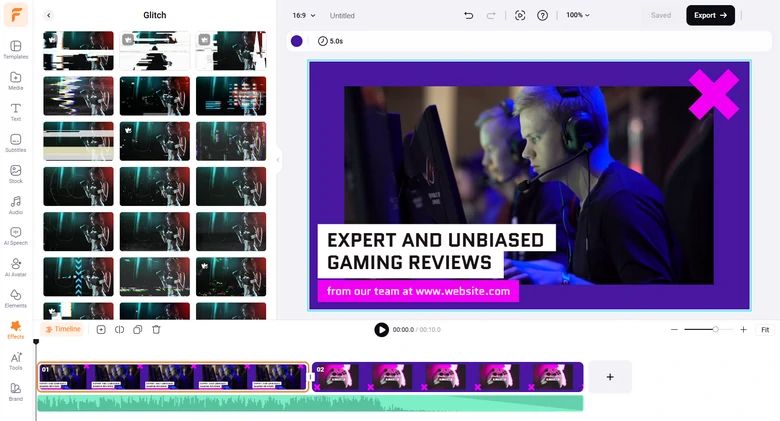
FlexClip Game Video Editor Interface
Pros of Using FlexClip's Video Game Editor
Cons of Using FlexClip's Video Game Editor
Price Plan
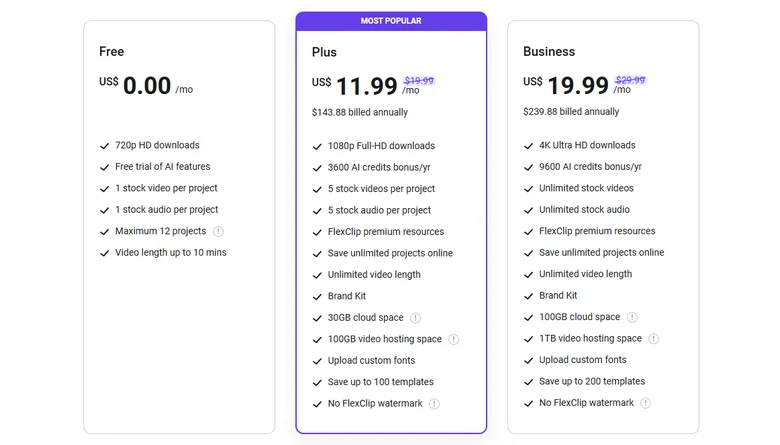
FlexClip Pricing Plan
2. Kapwing
Kapwing is a free online image and video game editor for both amateur and professional creators. With collaborative, accessible, and fast software, you can enable your entire team to create multimedia with the best video editor for game clips. Save time by subtitling, creating collages, editing bug reports and screencast videos, annotating photos, and doing other chores.
Pros of Using Kapwing's Video Game Editor
Cons of Using Kapwing's Video Game Editor
Price Plan
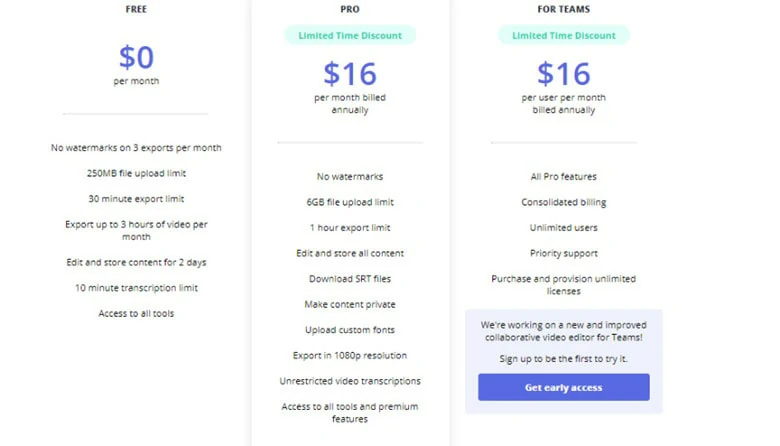
The Price Plan of Kapwing
3. Movavi
Movavi's video game editor is a more powerful version of a consumer-friendly video editing tool. This application has everything you need to edit videos for social media and video streaming. This is the reason it is considered the best video editor for game clips. It also works with Windows 11.
Pros of Using Movavi's Video Game Editor
Cons of Using Movavi's Video Game Editor
Price Plan

The Price Plan of Movavi
4. Fastreel
With fastreel video game editor crop, compress, convert, or perform any other operation in just a few clicks with any of 23 stand-alone functions. You can also use our ready-made templates to quickly create professional videos.
Pros of Using Fastreel's Game Video Editor
Cons of Using Fastreel's Game Video Editor
Price Plan
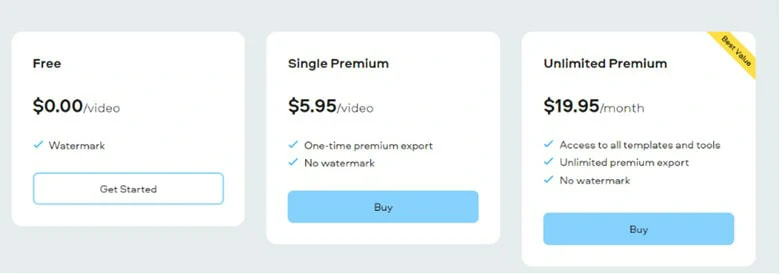
The Price Plan of Fastreel
5. iMovie
Apple's iMovie is a video editing software tool. Editing options include the ability to tweak and improve video color settings, crop and rotate video clips, stabilize shaky movies, add video transitions, and change clip speed. It is a top video editor for game clips.
Pros of Using iMovie's Game Video Editor
Cons of Using iMovie's Game Video Editor
Price Plan

The Price Plan of iMovie
6. Openshot
This video game editor allows you to easily integrate several video clips, graphics, and music; cut off extraneous areas; separate the audio file from the video; mute or reset the volume; and mix audio and video files.
Pros of Using Openshot's Game Video Editor
Cons of Using Openshot's Game Video Editor
Price Plan
It’s free to use.
7. Final Cut Pro
Final Cut Pro is a fantastic tool for video game editors who want to work on Macs. This professional video editing app for macOS users includes a variety of powerful tools such as filters, motion graphics, special effects, and more and makes it the best video editor for game clips.
Pros of Using Final Cut Pro's Game Video Editor
Cons of Using Final Cut Pro's Game Video Editor
Price Plan
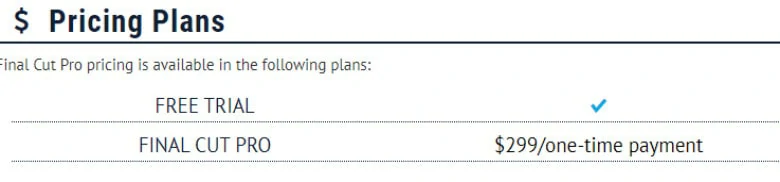
The Price Plan of Final Cut Pro
8. VSDC
VSDC is a Windows non-linear video editor. Here are some popular features made possible by non-linear video editing technology:
Pros of Using VSDC's Game Video Editor
Cons of Using VSDC's Game Video Editor
Price Plan
VSDC is offered in two versions: free and $19.99 Pro.
The Bottom Line
This post has provided the top video games editors in 2022, along with its essential features, pros, cons, and information on what to consider before downloading. The programs mentioned above are particularly adept in usability and feature-rich, allowing you to create a professional video using only clips and audio.




FlexClip AI Video Maker
Reach professional-quality videos faster with easy editing tools, templates, and smart AI.
Start Now for Free
Hot & Trending
-
Best Ways to Find Music in YouTube Videos
-
Instagram Story Video Quality Bad After Upload? Fix It!
-
How to Repost Video on TikTok & How to Remove TikTok Repost
-
Improve Video Quality Online: 3 AI Video Quality Enhancers You Can't Miss
-

4K Convert to HD 1080p without Watermark: Best 4k Video Converters
-
Best 8 Free Video Editors - No Download Required
-
Top 13 Birthday Video Makers with Music and Effects Free
-
How to Search Filters on TikTok & Use a Filter You See - TikTok Filter Guide